




































































Waste Ink Pad Reset for Epson® & Canon® PrintersUK Alternative to WIC Reset Utility
Resolve E11, E-10, W-01 and 5B00 service errors easily. Perform a safe, reliable WIC waste ink pad counter reset on your Epson or Canon printer via USB cable or Wi-Fi directly at home or in your workshop.
View all supported models (1732 devices)
These printers feature a replaceable maintenance cartridge with an electronic chip. Software reset clears the internal sponge counter (Platen Pad). If the main Maintenance Box is full, the cartridge must be physically replaced or reset using a hardware chip resetter.
| Message / Error Code | What does it mean? | Solution |
|---|---|---|
Platen Pad Error e.g. E-11, W-01 | Full internal sponge counter on the mainboard | ✓WINK Reset PRO 100% software reset via USB |
Maintenance Box e.g. 034841, 034842 | Full replaceable maintenance cartridge with chip | ⚠️Cartridge Replacement New cartridge or hardware resetter |
Why Choose WINK Reset?
USB & Wi-Fi Detection
Automatic detection of connected printers (Plug & Play) via USB cable or local Wi-Fi network directly in the software.
Free 85% Trial Printer Reset
Perform a free printer reset from 100% down to 85%! Test printer communication completely risk-free before purchasing a full key.
Advanced Telemetry & Fast Support
In case of any questions, our support team analyzes printer communication logs and assists in completing the reset smoothly.
Epson EcoTank & Canon MegaTank Support
Regularly updated to support the latest Epson EcoTank and Canon MegaTank series, including models without physical reset buttons.
Complete Waste Ink Pad & Counter Reset
One key performs a full reset for the waste ink pad: resets the main pad, borderless platen pad, and clears service error codes.
Hardware-Safe Reset Procedure
The software only performs a safe reset of the waste ink pad counter. Printhead calibration, factory settings, and Wi-Fi configurations remain 100% untouched.
UK Waste Ink Counter Reset Key
A single-use reset key permanently clears the waste ink counter back to 0% for one Epson or Canon printer. Dispatched instantly to your email inbox.
Step-by-Step Reset Guide
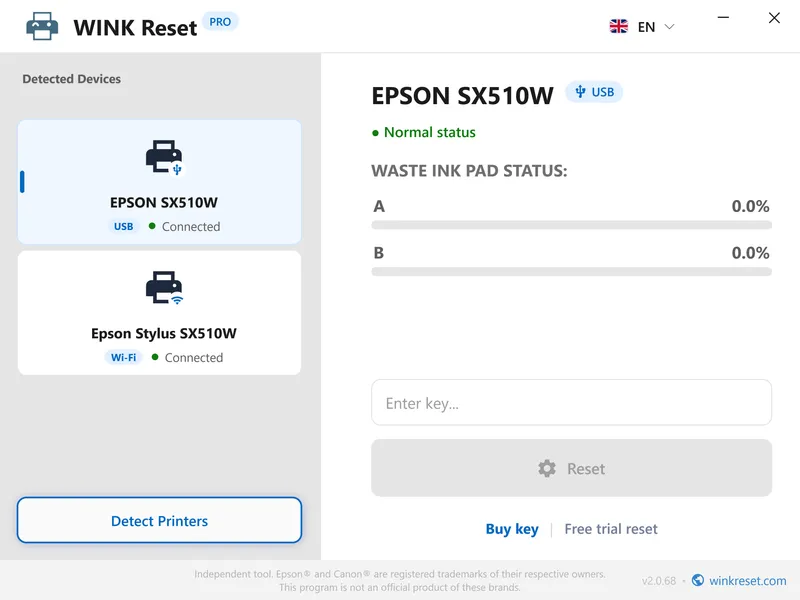
Follow the complete printer waste ink pad reset walkthrough in WINK Reset PRO:
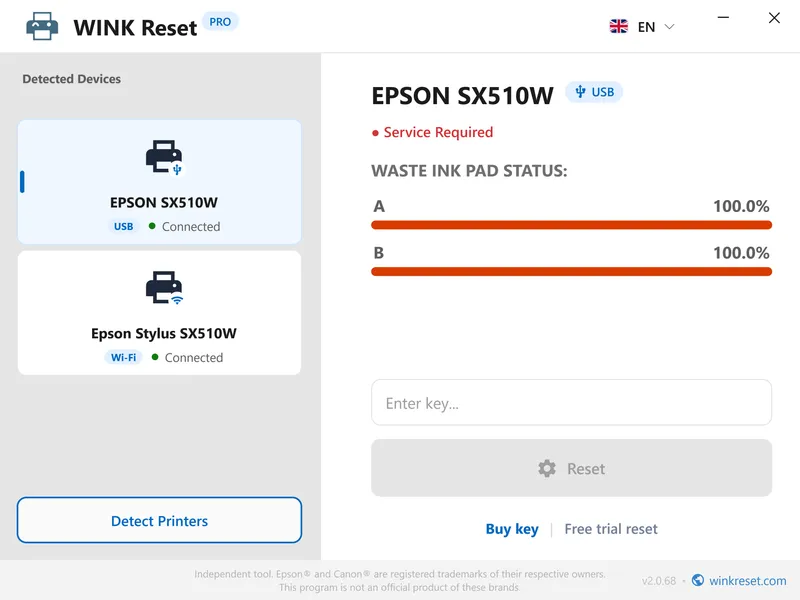
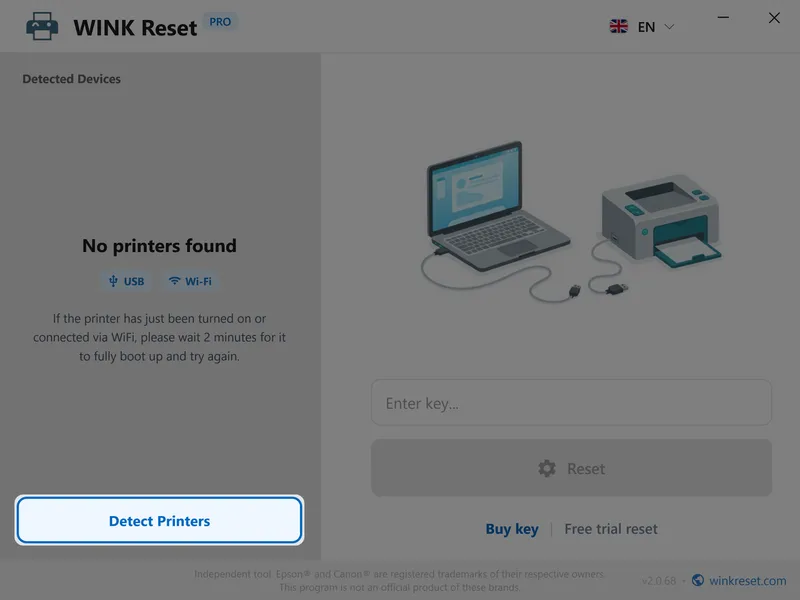
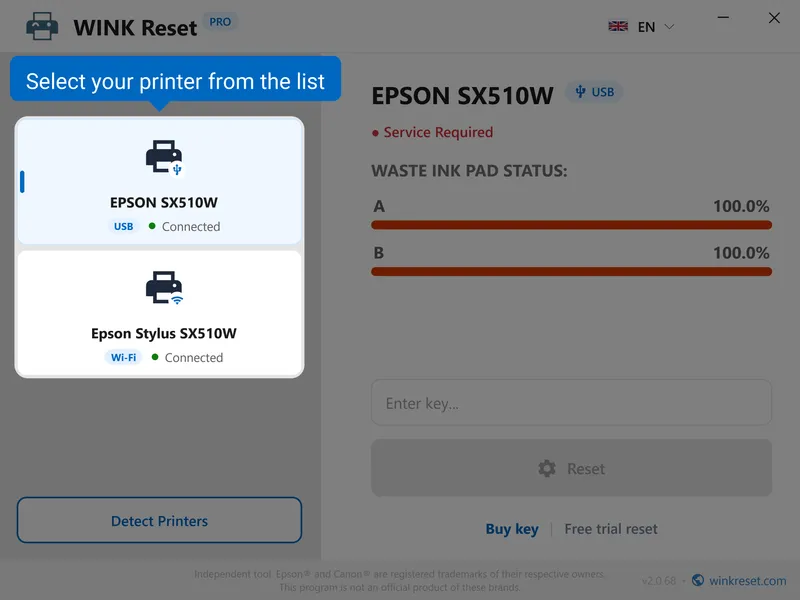
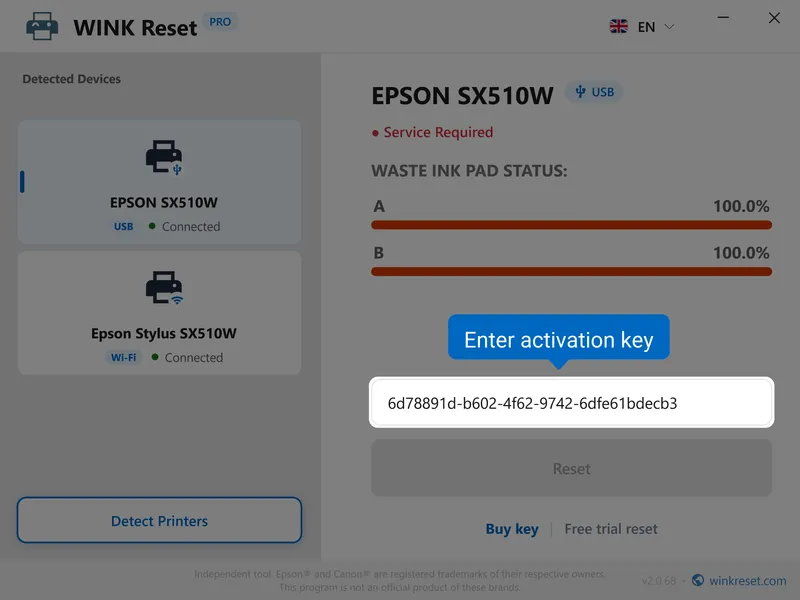
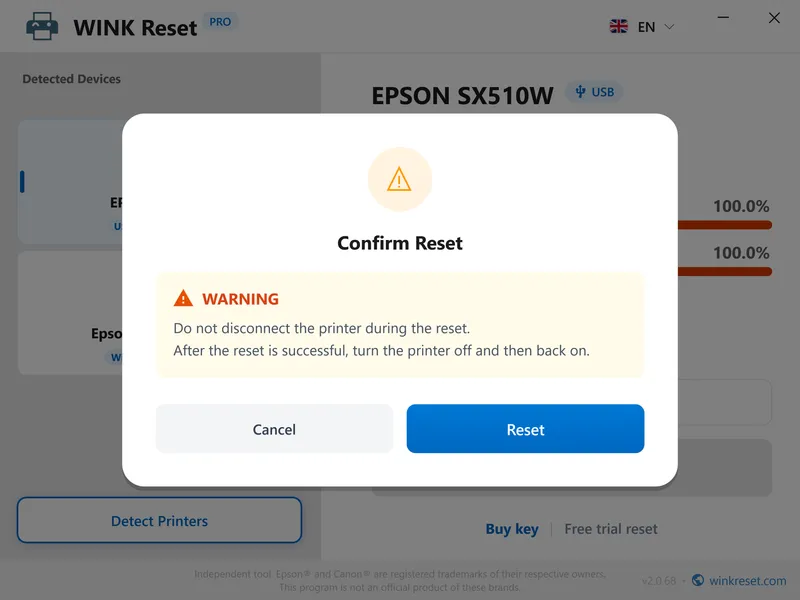

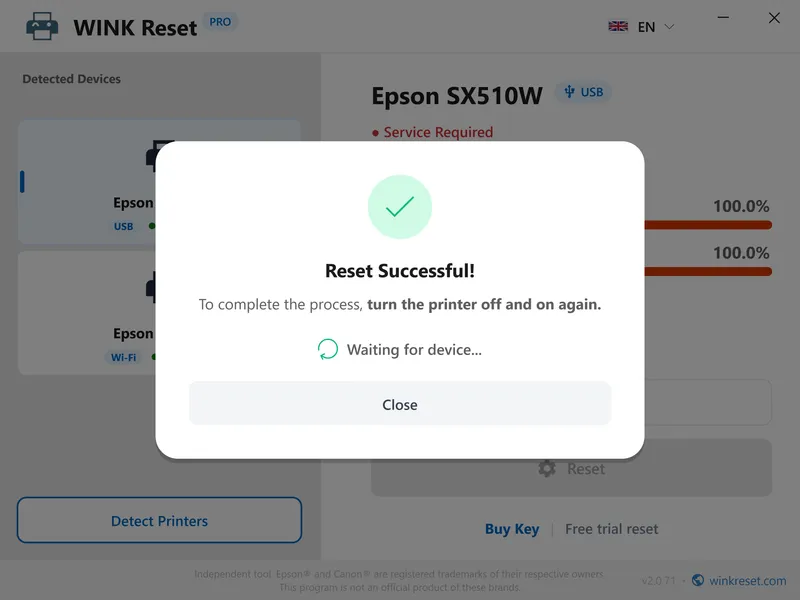
WINK Reset Interface - Safe waste ink pad & reset WIC procedure (Epson / Canon)
Common Error Codes Resolved by WINK Reset
Check the service alert code showing on your printer:
| Printer Error Code | Technical Details & Remedy |
|---|---|
| E-11 / E-10 | The printer waste ink pad is at the end of its operational service life. Resolved immediately via software reset (ET-2820, ET-2850, L3250 series). |
| W-01 | Epson service required prompt. Cleared directly through software counter reset. |
| 5B00 / P07 / 5B02 | Waste ink absorber full error (5B00 / P07 / 5B02 on Canon Pixma series). Cleared via service mode reset. |
| 1700 / E08 / 1702 | Ink absorber nearly full warning (code 1700 / E08). Early warning before full lockup. |
| 7 or 8 Status LED Flashes | Alternating amber and green status LED flash sequence on Canon printers without a display panel. |
| Display / Driver Message | A parts inside your printer is at the end of its service life. Contact authorised service. |
| Service Required | Waste ink counter has reached 100% capacity limit. Software reset required. |
Frequently Asked Questions about Waste Ink Pad & Counter Reset (FAQ)
Do I need to physically clean or replace the waste ink pad before performing a reset?
WINK Reset PRO is designed as the concluding software step of printer maintenance. After inspecting, cleaning, or replacing the saturated waste ink pads inside your printer, the tool performs a safe counter reset, permanently restoring the device to normal operational status.
Is performing a reset safe for my printer?
Yes, the procedure is 100% safe. The utility only performs a safe reset of the waste ink pad counter without altering printhead calibration, factory settings, or Wi-Fi configurations.
Which printers are supported and can I perform a reset on my model?
WINK Reset PRO supports over 1,700 inkjet printer models. Frequently reset devices across the UK, US, and international markets include:
• Expression & WorkForce : XP-65, WF-7310, XP-452, XP-2100, XP-3100, Stylus P50
• EcoTank ET Series : ET-4800, ET-2750, ET-2870, ET-2710, ET-2820, ET-2850
• EcoTank L Series : L3250, L3150, L3110, L3210, L4260
Before purchasing a full key, you can verify your device in seconds using our model checker above or download the software to run a free counter read and trial reset to 85%.
What is a complete counter reset and do I need to buy multiple keys?
No, you only need one single reset key. Modern printers store waste ink data across several sections (the main waste ink pad and the borderless platen pad). WINK Reset PRO performs a comprehensive counter reset for all associated sections simultaneously in one click, permanently clearing the service error code.
What if the free trial reset to 85% does not work?
If the reset to 85% does not resolve the error, it indicates that the problem may be mechanical (e.g., sensor malfunction or physical overflow of the waste ink tank). In this case, a full key is not needed, and the printer may require mechanical service.
How quickly will I receive my reset key after purchase?
Your reset key is generated and delivered instantly to your email address right after payment (available 24/7).
How to uninstall WINK Reset PRO?
To uninstall the software, open the Start menu and select Settings > Apps. Find WINK Reset PRO in the list of installed applications and click Uninstall. The removal process takes only a few seconds and leaves no trace.
Do you offer wholesale packages for repair shops and key resellers?
Yes! We offer tiered wholesale packages with volume discounts, instant invoicing, and flexible master Multi-Key formats for technicians. Check out our B2B Wholesale Portal.
Do you have an affiliate or creator partner program?
Yes! Content creators, tech bloggers, and repair portals can earn commissions on all referred sales. Learn more on our Affiliate Program Page.